
Business
Website Admin Dashboard: What It Is, What You Can Manage and Do You Need One?
What a website admin dashboard is, what you can manage with it, the signs you need one, and why every website we build includes one, even the ₦250,000 plan.
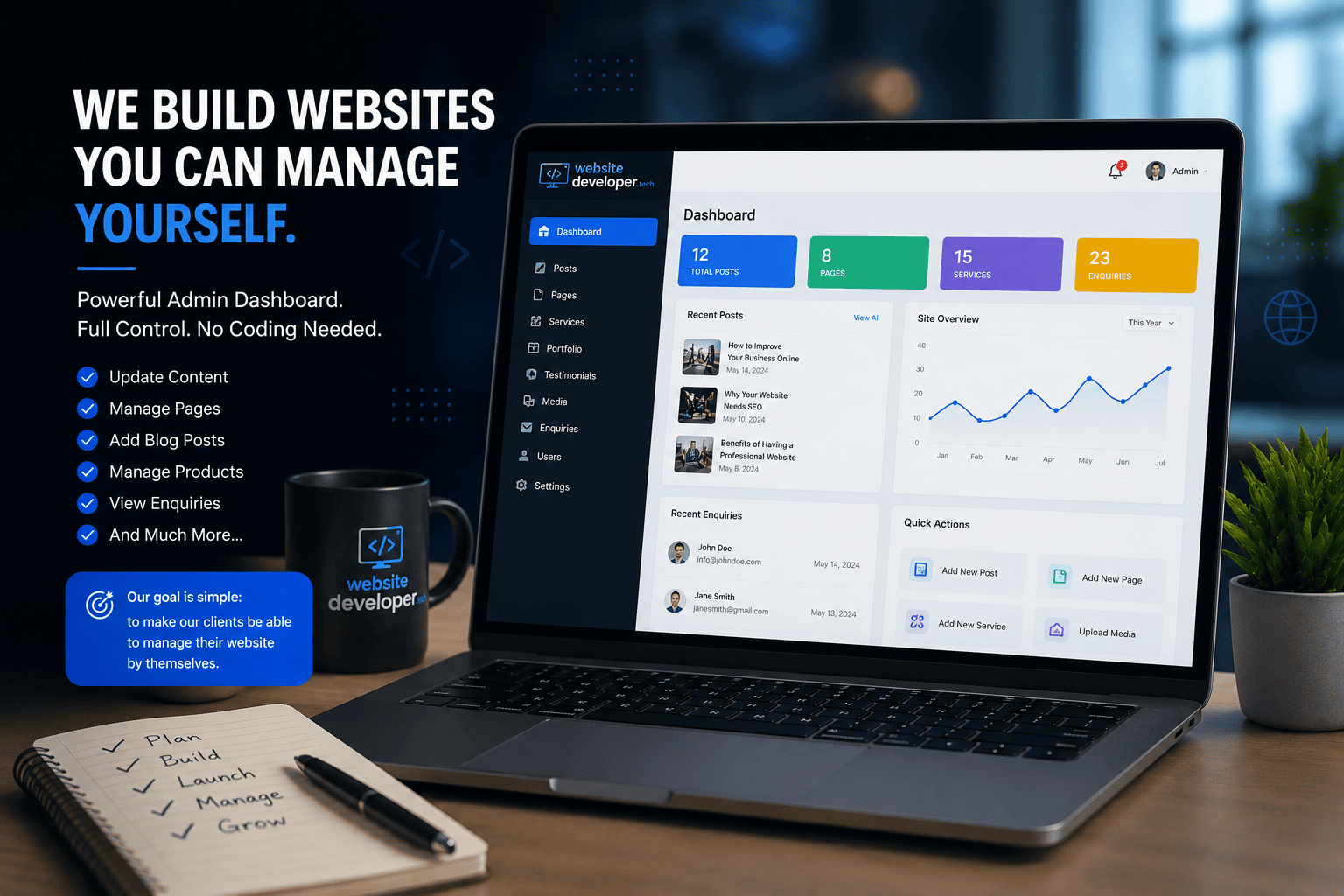
Quick answer: An admin dashboard is the private, login-protected area of your website where you update text, photos, prices, products and blog posts yourself, without code or a developer. You need one if your website will change more than rarely. Every website Website Developer Tech builds includes one, including the ₦250,000 business website.
See our Custom Web Applications
What Is a Website Admin Dashboard?
Your website has two sides: the public pages visitors see, and a control panel behind them that only you and your team can log into. That control panel is the admin dashboard. Instead of editing code or messaging a developer, you log in, change what you need through simple forms and buttons, and save.
What You Can Manage From the Dashboard
What your dashboard includes depends on the website, but these are the most common areas:
| Area | What you can do |
|---|---|
| Pages | Edit text and images on the home, about, services and contact pages |
| Blog | Write, edit and publish posts, add featured images, set each post's SEO title and description |
| Services and prices | Add, edit, reorder or hide services and update prices |
| Portfolio and case studies | Add new projects with photos and descriptions |
| Team and testimonials | Update staff photos, titles and bios; add new testimonials |
| Settings | Change phone numbers, email, social links, opening hours and logo |
| Products and orders (stores) | Manage products, stock, categories, orders and customers |
| Registrations and enquiries | See form submissions and registrations in one place |
For schools and training businesses the dashboard can go further. For IMT Computers, the team manages courses, student registrations and a learning management system from theirs, and each registration also arrives by email and in the database.
5 Signs You Need an Admin Dashboard
- You change prices, services or promotions more than once or twice a year.
- You want to publish blog posts or news, which is one of the simplest ways to rank for more searches.
- You sell products whose stock and prices change.
- You have already paid a developer for a "quick update".
- You want to add testimonials, projects or team members as they happen, not months later.
What Happens Without One
Every typo fix, price change or new photo becomes a request to your developer. Two-minute updates take days and often come with a fee. Over time, either the website quietly goes out of date, with old prices and no new content, or you spend more on small change requests than the dashboard would have cost.
When You Might Not Need One
If your website is a single page that will genuinely never change, such as a digital business card with your name and number, you may never log in. That is rare. Most businesses change their services, prices or photos at least occasionally, and the dashboard pays for itself the first time you would otherwise have called a developer.
Security and Staff Access
- Login protection, so only authorised people get in
- Separate accounts for staff, with permissions set by role
- HTTPS on every page, including the dashboard
- Backups, so a mistake can be undone
How the Dashboard Helps Your SEO
Websites that are kept current tend to perform better in search over time. With a dashboard you can publish articles that answer your customers' questions, keep services and prices accurate, and edit each page's SEO title and description yourself, instead of waiting for a developer.
How We Handle It at Website Developer Tech
Every website we build includes its own admin dashboard as standard, not as a paid add-on, from the ₦250,000 business website to online stores, school portals and custom web applications. We set it up with your real content and show your team how to use it before launch. See our website prices.
Frequently Asked Questions
Do I need coding knowledge to use the dashboard?
No. It uses simple forms, buttons and menus designed for non-technical users.
Can several staff members use it?
Yes. We can create separate accounts for your team, each with permissions that match their role.
Can I update my website from my phone?
Yes. The dashboard works on phones as well as laptops.
Does an admin dashboard cost extra?
With some developers it does. With us it is included on every website, including the ₦250,000 plan.
Can a dashboard be added to an existing website?
Often yes, but it is easier and cheaper to build it in from the start than to add it to a site that was not designed for one.
Can new features be added to the dashboard later?
Yes. As your business grows we can extend it with new sections, such as bookings, courses or a store.
Contact Us
Tell Us About Your Website Project
Send us a few details about your business and what you need. We will review it and come back with a free consultation and quotation. Prefer to talk? Call or WhatsApp us.
-
Call us+234 813 545 7984
-
WhatsAppChat with us on WhatsApp